How to create Cisco console cable by yourself
1. Preparation
You should prepare the following two, as well as a Cisco and a console-terminal.
* RJ45-DSub9Pin Cable Changer (In=RJ45 Female, Out=DSub9Pin Female)
As far as I know, you can buy it at the following shops for about 500 yen:
o Jimbo-Shokai (Akiba, Tokyo, Japan)
o Plathome (Akiba, Tokyo, Japan)
* Ethernet Category-5 straight cable
Other category would be okay.
2. how to connect them
Please see the following picture. At least you must connect DSub9Pin's 2, 3, and 5 to the correct corresponding port on RJ45; others are optional.
RJ45-DSub9pin Connector Pin Layout
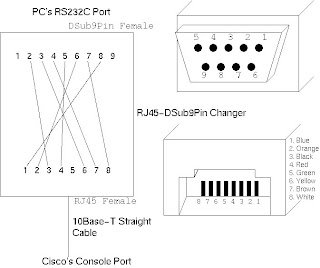 REF:->>> http://www.kame.net/~suz/cisco-cable.html
1. Preparation
You should prepare the following two, as well as a Cisco and a console-terminal.
* RJ45-DSub9Pin Cable Changer (In=RJ45 Female, Out=DSub9Pin Female)
As far as I know, you can buy it at the following shops for about 500 yen:
o Jimbo-Shokai (Akiba, Tokyo, Japan)
o Plathome (Akiba, Tokyo, Japan)
* Ethernet Category-5 straight cable
Other category would be okay.
2. how to connect them
Please see the following picture. At least you must connect DSub9Pin's 2, 3, and 5 to the correct corresponding port on RJ45; others are optional.
RJ45-DSub9pin Connector Pin Layout
 REF:->>> http://www.kame.net/~suz/cisco-cable.html


